
 EN
EN  DE
DE 
WOW Vegas Casino App: Download for iOS & Android 2026
WOW Vegas gives mobile players a friendly social casino experience with instant browser play, quick account access, and a large library of slots, shooting games, live dealer tables, and specialist titles. The platform works on iPhone, Android phones, tablets, and desktop browsers without forcing a full installation, so players can register, claim rewards, buy coin packages, and request redemptions from the same account.
WOW Vegas Casino Mobile App Review
The WOW Vegas app works as a mobile web version, not a separate App Store product. It opens directly in the browser, fits phone screens cleanly, and keeps the main lobby, wallet, rewards area, profile tools, and game categories easy to reach. This setup avoids storage issues, risky APK files, and manual installer updates.
The lobby loads in a compact layout, games adjust to smaller screens, and players can move between WOW Coins play and Sweep Coin (SC) promo play. The Store, balances, rewards, and VIP progress stay connected across devices after WOW Vegas login.
A WOW Vegas casino app download is not required for regular play. Game filters, recent games, and the Rewards Hub are easy to find, while payment tools remain close to the account area.
How to Play WOW Vegas Casino on Mobile
Getting started from a phone takes only a few minutes. The WOW Vegas mobile app experience runs through Safari, Chrome, or another updated browser on iOS and Android:

Visit WOW Vegas from your mobile browser and let the homepage load.
Use your existing login details or create a new account.

Open the Rewards Hub and get bonus coins from the active free rewards.
Select WOW Coins or SC from your account balance.
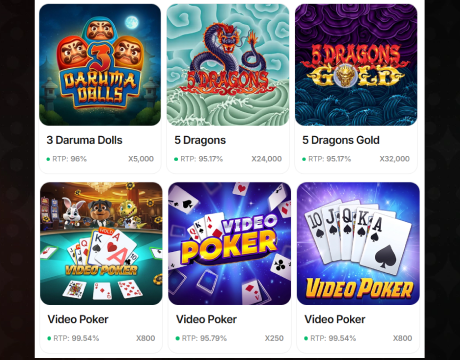
Browse slots, shooting games, live dealer titles, or specialist games.
Tap the game tile and use the on-screen controls.
WOW Vegas App System Requirements
WOW Vegas is light on system demands because play runs through an updated browser. A modern device and stable internet are the main requirements.
| Requirement | iOS | Android |
|---|---|---|
| Access method | Safari browser, no Apple download required | Chrome browser, no Google Play download required |
| Supported devices | iPhone and iPad | Android phones and tablets |
| Operating system | Recent iOS version with updated browser | Recent Android version with updated browser |
| Storage space | No full app install required | No APK install required |
| Internet connection | Stable Wi-Fi or mobile data | Stable Wi-Fi or mobile data |
How to Update the WOW Vegas Casino App
Updates are handled through the website, so players do not need to download the app again or search for a new installer. Keeping the browser fresh is enough:
- Refresh your browser: Close the WOW Vegas tab and open it again.
- Clear old data: Clear cache and cookies if buttons or games fail to load.
- Update the browser: Install the latest Safari, Chrome, or system browser version.
- Restart your device: Reboot the phone if the page still loads slowly.
- Log in again: Return to WOW Vegas and check the lobby, Store, and rewards.
Registration Process via WOW Vegas Casino App
Registration is designed for quick mobile signup. New players can create an account, collect the welcome bonus, and start exploring games in the same browser session:

Open the registration form from the mobile homepage.

Add your email, password, name, date of birth, and location details.

Confirm that you meet age and eligibility requirements.
Submit the form and enter your new WOW Vegas account.
Collect the sign up bonus and check the Rewards Hub.
Casino Games Available in the App
WOW Vegas’ mobile lobby is built around fast browsing and clear game groups. Players can open slots, shooting titles, live dealer games, and specialist instant-play games from one account. The selection includes classic casino themes, arcade-style rounds, and live tables for short or longer mobile sessions on any device.
Slot Games
WOW Vegas offers a wide slot section with familiar reel formats and bonus rounds. These listed titles are available in the slot category:
- Rise of Cetus;
- Mystic Alaska;
- Huff House Bonanza;
- 3 Pots of Olympus Hold & Win.
Shooting Games
Shooting games add arcade-style action to the casino lobby. The following titles fit this category:
- Sparkle Fishooter Shoot and Win;
- Fortune Zombie St Patrick Shoot and Win;
- Lucky Shooter 2: Shoot and Win;
- Mega Fishing.




Live Dealer Games
Live dealer games bring streamed table action into the browser. Players can open these titles from compatible mobile devices:
- Grand Bonus Blackjack;
- WOW Euro Auto Roulette;
- Bubble Crapless Craps;
- Gravity Roulette.
Specialized games
Specialized games focus on quick rounds and simple controls. These titles are easy to find in the mobile lobby:
- Dice;
- Limbo;
- Mines;
- Dragon Tower.
Bonuses You Can Access in the WOW Vegas Casino App
WOW Vegas bonuses start at registration and continue through daily activity, promotions, special offer deals, and VIP progression. New players receive 150,000 WOW Coins + 2 SC as a welcome bonus. The first purchase package gives 1,500,000 WOW Coins + 30 Free SC for $9.99, with 200% extra value.
Daily, weekly, and monthly rewards keep the account active. The Rewards Hub tracks progress and lets players claim free play every day. The Daily Loyalty Bonus works as a regular login bonus, giving SC rewards based on the previous day’s activity. WOW Vegas does not use a standard deposit bonus model, since rewards are connected to free coins, purchases, loyalty activity, and VIP status. The VIP Hub adds progress from Bronze to Elite, with stronger perks as players move through the loyalty system.
Deposits & Withdrawals via the WOW Vegas Casino App
WOW Vegas uses coin package purchases and prize redemptions. Players buy WOW Coin bundles through supported payment methods, while eligible SC balances are used for prize requests after account checks and redemption rules are met.
| Category | Details |
|---|---|
| Minimum purchase | $1.99 |
| Purchase methods | Google Pay, Visa, Mastercard, American Express, Trustly Online Banking, Skrill |
| Card processing | Card purchases are powered by Nuvei |
| Fee note | A processing fee of 2.9% is added to the transaction, with a maximum fee of $10 |
| Redemption methods | Skrill, Prizeout, Trustly Online Banking, Masspay |
| Cash prize minimum | 50 SC |
| Gift card minimum | 20 SC |
| Processing time | Up to 3 business days |
Security Features of the WOW Vegas Mobile App
Security matters on mobile because players still use account details, payment tools, and redemption information on smaller devices. WOW Vegas protects the experience through encryption protocols, secure data transmission, account login safeguards, verification checks, secure payment options, and support review.
Players should keep the browser clean, enter payment details correctly, and respond to verification requests. Use a private device, a strong password, and trusted Wi-Fi or mobile data. Avoid third-party installers, fake APK pages, and unofficial download pages.
Mobile Experience in the WOW Vegas Casino App
Mobile play is smooth because WOW Vegas keeps the main tools close together for new users and existing players. The lobby, wallet, Store, rewards, VIP area, and support links are built for touch navigation. Games load from tiles, filters help browsing, and balances are easy to check.
The online experience is strongest with a stable connection. Slots and specialist games are easy to control with one hand, while live dealer games work best on a larger phone or tablet. The browser format also means there is no app size to manage. WOW Vegas works well for daily reward claims and longer casino-style sessions. Players can add the site to the iPhone or Android home screen and open it like a regular WOW Vegas casino app icon.
FAQs About the WOW Vegas Casino App
Is the WOW Vegas Casino App available in my region or country?
WOW Vegas accepts registration outside Idaho, Nevada, and Washington. Sweep Coin play is unavailable in MI, MT, CT, LA, MD, NJ, NY, CA, TN, IL, IN, and Quebec.
How can I play WOW Vegas Casino on my mobile device?
Open WOW Vegas in Safari or Chrome, sign in, claim available rewards, choose a play mode, and launch games from the mobile lobby.
What games are available in the WOW Vegas Casino App?
The game library includes slots, shooting games, live dealer tables, jackpots, Megaways titles, and specialist games such as Dice, Mines, Limbo, and Dragon Tower.
How do I update the WOW Vegas Casino App to the latest version?
Refresh the browser, clear the cache if needed, update Safari or Chrome, restart the device, and log back in to load the newest site version.
What should I do if the WOW Vegas Casino App is not working properly?
Check your internet connection, refresh the page, clear the browser cache, try a different payment method or browser, and contact support with screenshots if needed.
How can I remove WOW Vegas Casino from my mobile browser?
Delete the home screen shortcut, clear browser data for WOW Vegas, close saved tabs, and remove saved login details from your device settings.

 PokerListings




Log in to leave a comment
Takes a minute. Your rating counts toward the score.