
 EN
EN  DE
DE 
TaoFortune Casino Mobile App Review
The TaoFortune app provides a free social casino experience with more than 850 games, daily activities, Magic Boxes, and VIP Club progression. The TaoFortune casino app is available for Android through Google Play, while iPhone and iPad users play through the official website. TaoFortune is a free entertainment platform for users aged 21 or older. The platform does not offer monetary rewards.
How to Play TaoFortune Casino on iOS
TaoFortune has no native iOS application in the Apple App Store. Players can use the online platform through Safari or another up-to-date browser on iPhone without installing software:

Launch a browser and enter the official TaoFortune website address.

Register a new account or open the login page.

Enter the requested details and confirm your eligibility.
Collect the available free coins after registration or through current TaoFortune rewards.
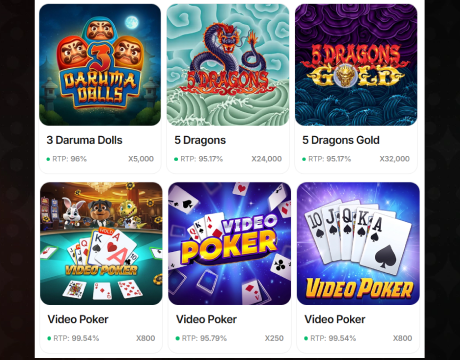
Browse featured titles, recommendations, and new games.

Select a title, choose the number of coins to use, and start playing.

Open the sharing menu and select Add to Home Screen.

Tap the TaoFortune shortcut for future browser access.
How to Play TaoFortune Casino on Android
TaoFortune has an official Android application published by A1 Development, LLC on Google Play. Players should download the app from this store instead of using an unofficial APK file:

Search for the TaoFortune mobile app and check the developer name.

Google Play confirms whether the device supports the current version.

Start the download and complete the installation.
Launch it from Google Play or the home screen.

Create an account or enter existing details.
Explore the TaoFortune lobby, select a title, start playing, and check your VIP Club progress.
Turn on automatic updates for TaoFortune in Google Play.
TaoFortune App System Requirements
TaoFortune supports Android phones and tablets through its official Google Play app. iPhone and iPad users can access TaoFortune directly through a current mobile browser without installing an application.
| Requirement | TaoFortune Android App | TaoFortune iOS Browser Access |
|---|---|---|
| Access | Google Play app | Official TaoFortune website |
| Supported devices | Android phone or tablet | iPhone or iPad |
| Operating system | Android 9 or later | Current iOS |
| App size | 111 MB | No installation required |
| Browser | Not required | Safari, Chrome, or another current browser |
| Internet connection | Wi-Fi or mobile data | Wi-Fi or mobile data |
How to Update TaoFortune Casino on Mobile
TaoFortune distributes Android updates through Google Play. Recent releases focus on bug fixes and performance improvements. Browser users receive website changes directly:
- Open Google Play: Find TaoFortune under Manage Apps and Device.
- Select Update: Install the latest available official release.
- Restart TaoFortune: Reopen it after the update finishes.
- Update iOS software: Install available browser or operating system updates.
- Refresh the website: Close old tabs and reopen TaoFortune.
- Clear cached data: Use this step when an outdated page remains visible.
Registration Process via TaoFortune Casino App
TaoFortune registration creates an account that works in the Android app and through a browser. New users can start from the Sign Up button in the lobby:
Launch the Android app or open the official TaoFortune website.

Continue with Google, Facebook, Apple, or email.
Add a valid email address and create a password.

Select “I have promo code” and enter the code if you have one.
Verify that you are at least 21 years old.
Declare that you do not live in a restricted state.

Agree to the TaoFortune Terms of Use and Privacy Policy.
Select Create Free Account to complete registration.
Casino Games Available in the TaoFortune App
TaoFortune offers more than 850 free social casino games through its mobile lobby. Players can browse featured titles, new releases, recommended games, classic slots, Hold ’N’ Link options, Bonus Combo games, fishing titles, shooting games, and keno.
TaoFortune Slots Games
The TaoFortune casino app offers fruit, animal, coin, and bonus-themed slots. Popular TaoFortune titles include:
- 888: Bonus Combo;
- 3 Crowns: Bonus Combo;
- Tidal Gold;
- Carnival Cat;
- Luck of Panda: Bonus Combo;
- Amazing Diamonds: Hold ‘N’ Link;
- Piggy’s Vault: Power Coins.



TaoFortune Specialised Games
TaoFortune also offers fishing, shooting, and keno games, including:
- Ice & Fire Fishing;
- Thunder Fishing;
- Jackpot Fishooter;
- Lucky Shooter;
- Keno;
- Galaxy Fishing;
- Circus Jackpot.




Bonuses You Can Access in the TaoFortune Casino App
The TaoFortune mobile app gives new users a welcome bonus of 100,000 TAO Coins after account registration. Email verification unlocks another 75,000 TAO Coins, while a promo code adds the reward linked to that specific code.
Current promotions include the Exclusive Welcome Pack, which contains five purchase stages with rewards of up to 6.15 million TAO Coins, 261 Secret Coins, and 90 Free Plays. The Daily Drop provides a reward every 24 hours, with larger amounts unlocked through higher VIP Club levels. TaoFortune also runs a 10-day Daily Streak with rewards for each login and a final Day 10 purchase deal.
TaoFortune does not use a traditional deposit bonus because players purchase coin packages instead of funding a cash balance. Each promotion displays its price, included coins, Free Plays, extra percentage, and collection conditions inside the TaoFortune app.
Deposits & Withdrawals via the TaoFortune Casino App
TaoFortune uses coin purchases instead of conventional casino deposits. Packages start at $4.99, and the purchased TAO Coins and included Secret Coins are added instantly. Players can pay with PayPal or a bank card. Players use Secret Coins in SC Mode for a chance to win exclusive prizes.
| TaoFortune Transaction | Details |
|---|---|
| Minimum purchase | $4.99 |
| Processing time | Instant |
| PayPal | Available |
| Bank cards | Available through the Add New Card option |
| TAO Coins | Added to the account after purchase |
| Secret Coins | Included with selected packages and used in SC Mode |
| Prize access | SC Mode provides opportunities to win exclusive prizes |
Security Features of the TaoFortune Mobile App
TaoFortune encrypts data during transmission, which protects account details and activity while information moves between the device and platform servers. The Android app is distributed through Google Play, reducing exposure to modified or unofficial APK files. TaoFortune also provides a secure login and allows users to request deletion of collected personal data.
Essential cookies maintain sessions, remember login settings, and support account form functionality. Performance and functionality cookies support faster loading and saved preferences. Players should use a unique password, install TaoFortune only from Google Play, access the official website on iOS, and never share login details.
Mobile Experience in the TaoFortune Casino App
TaoFortune provides fast access, clear navigation, and a well-organized mobile lobby. The Android app brings games, daily activities, promotions, account settings, and VIP Club progress together in one interface. Players can browse featured titles, new releases, recommended games, and popular selections without moving through complicated menus.
The colorful cosmic design gives the platform a distinctive look, while higher VIP Club levels unlock additional rewards and benefits. Android users get a dedicated app, while iPhone and iPad users access TaoFortune through a mobile browser without installation. Both options connect to the same account and game selection.
Players can sign in with one TaoFortune profile across supported devices. A stable internet connection supports faster loading, and the visible navigation makes it easy to return to the lobby, check activities, manage the account, and review VIP Club progress.
FAQs About the TaoFortune Casino App
Is the TaoFortune Casino App available in my state or country?
TaoFortune is available only in eligible US states. It is unavailable in Connecticut, Delaware, Idaho, Louisiana, Michigan, Montana, Nevada, New Jersey, New York, Rhode Island, Tennessee, Washington, and West Virginia. California, Indiana, Maine, and Maryland allow TAO Coins mode only.
How can I play TaoFortune Casino on my iOS device?
Open the official TaoFortune website in Safari, sign in or create an account, and play directly in the browser. You can also add a TaoFortune shortcut to your iPhone or iPad home screen.
What games are available in the TaoFortune Casino App?
TaoFortune provides more than 850 free social casino titles, including slots, Hold ‘N’ Link games, Bonus Combo releases, fishing games, and shooting games.
How do I update the TaoFortune Casino App to the latest version?
Open Google Play, find TaoFortune, and select Update. Browser users receive website updates automatically and should keep their browser and operating system current.
What should I do if the TaoFortune Casino App is not working?
Check your internet connection and restart TaoFortune. Android users should install the latest Google Play update. On iOS, refresh Safari, clear website data, and update the browser or operating system.
How do I remove the TaoFortune Casino App from my iPhone?
TaoFortune has no iPhone application. Delete its home screen shortcut, close saved tabs, and clear TaoFortune website data through the browser settings.

 PokerListings




Log in to leave a comment
Takes a minute. Your rating counts toward the score.