
 EN
EN  DE
DE 
Spinblitz Casino App: How to Play on Mobile (2026)
Spinblitz Casino Mobile App Review
Spinblitz works entirely through a mobile browser, so no software installation is required. There is no separate Spinblitz casino app for Android or iOS devices. Apple users can access the platform through Safari, while Android users can open it in Chrome or another supported browser. Without a Spinblitz app download, players can still use slots, live dealer games, arcade titles, promotions, Gold Coins (GC), Sweeps Coins (SC), balances, rewards, and account tools in a mobile-friendly lobby.
How to Play Spinblitz Casino on Mobile
Spinblitz works through a smartphone browser, so no APK installation is needed. Portrait mode provides the clearest experience:
Launch Chrome, Safari, Edge, or Firefox and enter the official Spinblitz address.

Select Join Now or use the login button for an existing Spinblitz profile.
Enable location services so Spinblitz can confirm that you are in an eligible US state.
Use Gold Coins for social play or Sweeps Coins for eligible sweepstakes play and redemptions.
Browse slots, live casino titles, arcade games, scratch-offs, exclusives, or new releases.
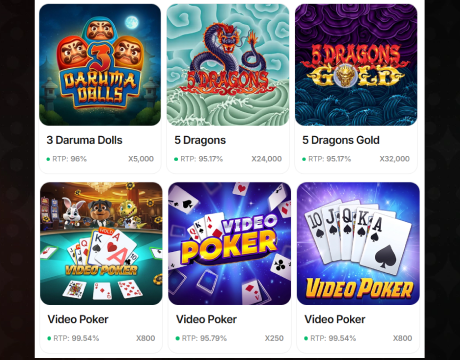
Tap a title, review its rules and coin requirements, and let the game load.
Select the coin value and use the on-screen controls. Spinblitz updates the account balance automatically.
Spinblitz App System Requirements
Spinblitz runs in a browser and has no fixed RAM, storage, or processor minimums. A Spinblitz casino app download is unnecessary because the site loads the newest version automatically.
| Spinblitz requirement | Android devices | iOS devices |
|---|---|---|
| Access type | Mobile browser | Mobile browser |
| Recommended browser | Current Chrome, Edge, or Firefox | Current Safari, Chrome, or Firefox |
| Installation file | No APK or Google Play download required | No App Store installation required |
| Screen position | Portrait mode | Portrait mode |
| Internet | Stable Wi-Fi or mobile data | Stable Wi-Fi or mobile data |
How to Update Spinblitz Casino on Mobile
Spinblitz updates centrally through the browser without a separate update package:
- Refresh Spinblitz: Close the game and reload the page to display the newest lobby.
- Restart the browser: Fully close and reopen Chrome, Safari, Edge, or Firefox.
- Clear cached files: Remove the browser cache if old graphics, frozen controls, or loading errors remain.
- Update the browser: Install the newest version through the device settings or official store.
- Update the device: Install the latest Android or iOS version supported by the phone.
- Free memory: Close unused applications before reopening Spinblitz.
- Sign in again: Return to Spinblitz and complete the login process to reload the account session.
Registration Process via Spinblitz Casino App
Registration is completed directly in a mobile browser and includes nine steps. Players do not need a Spinblitz casino app to create an account. They must be at least 21 years old and located outside the prohibited territories:
Visit the official Spinblitz website on your mobile device and select Join Now.

Provide an active email that you can access during the verification stage.
Set a password containing 8 to 20 characters, at least one uppercase letter, and at least one number.
Enter your first name, last name, and date of birth in the required fields.

Choose your current US state from the Spinblitz drop-down menu.
Complete the optional referral field if another Spinblitz player has invited you.

Read the Spinblitz Terms of Service and Privacy Policy, confirm that you are at least 21, and tick the consent box.
Select Play Now to submit the registration form.
Open the message sent by Spinblitz and follow the activation link. Check the spam folder or request another email when necessary.
Casino Games Available in the Spinblitz App
Spinblitz brings its casino categories into one mobile lobby. Players can browse more than 1,500 games, including slots, live tables, arcade releases, scratch-offs, and exclusive titles from multiple providers. Search tools and category tabs help users move between familiar games and new launches without leaving the browser or changing their Spinblitz account.
Slots Games
Spinblitz offers classic reels, Hold and Win releases, Megaways titles, cascading games, and feature slots. Popular Spinblitz options include:
- Burning Wins: Classic 5 Lines;
- Empire Gold: Hold and Win;
- Templar Tumble;
- Royal Fortunator: Hold and Win;
- Black Wolf Hold and Win;
- Cycle of Luck;
- Legend of Cleopatra Megaways.



Live Dealer Games
Spinblitz includes roulette, blackjack, baccarat, game shows, and live crash formats. The Spinblitz lobby lists:
- Live Roulette;
- Gravity Blackjack;
- Speed Blackjack;
- Auto Roulette;
- Grand Bonus Baccarat;
- Spin a Win;
- Crash Live.





Specialised Games
Spinblitz also provides faster formats outside standard slot and table categories. Specialised Spinblitz games include:
- Scratch Match;
- Luck & Magic Scratch;
- Scratch Alpaca Gold;
- Capymania Yellow;
- Gravity Plinko;
- Chicken Shot;
- Zeus’s Thunderbolt Plinko.



Bonuses You Can Access in the Spinblitz Casino App
The Spinblitz welcome bonus provides 7,500 Gold Coins and 2.50 Sweeps Coins for free after email verification. No purchase is required to receive this registration reward. Players can use Gold Coins for social casino games, while Sweeps Coins provide access to eligible sweepstakes play.
Spinblitz also runs daily login promotions with Gold Coins and Sweeps Coins awarded across a seven-day reward cycle. The first day provides 200 GC and 0.10 SC, while the seventh-day reward reaches 10,000 GC and 5.00 SC. Returning players must claim each reward from the account lobby.
A separate one-time promotion lets players choose from exclusive Gold Coin packages that include complimentary Sweeps Coins and free spins. Available bundles range from 50,000 GC with 25 SC and 25 spins to 500,000 GC with 250 SC and 250 spins.
Deposits & Withdrawals via the Spinblitz Casino App
Spinblitz does not use standard casino deposits or withdrawals. Players can make a Gold Coin purchase by credit or debit card, while eligible Sweeps Coins can be used to cash out through prize redemptions. Android and iPhone users can manage both options directly from their mobile browser.
| Spinblitz transaction | How it works |
|---|---|
| Gold Coin purchase | Open the store, select a Gold Coin package, review the order summary, and tap Pay Now. |
| Starting package | The entry package includes 4,000 Gold Coins for $1.99. |
| Payment methods | Spinblitz accepts supported credit and debit cards, including Visa, Mastercard, and Discover. |
| Sweeps Coin playthrough | Sweeps Coins must be played through at least once before they become redeemable. |
| Redemption value | One Sweeps Coin is equal to one US dollar for eligible prize redemptions. |
| Gift cards | Gift card redemptions require at least 10 SC and can take up to 48 hours to process. |
| Cash prizes | Cash prize redemptions require at least 75 SC, and the funds are sent to the verified bank account within three to five business days. |
Security Features of the Spinblitz Mobile App
Mobile access does not require a Spinblitz casino app download, but accounts are protected with passwords, CAPTCHA checks, location controls, SSL encryption, and identity verification through Veriff. Players may need to provide valid identification and proof of address. Spinblitz also monitors duplicate accounts, payment misuse, automated activity, and location masking.
Mobile Experience in the Spinblitz Casino App
Spinblitz delivers a smooth mobile experience through a responsive browser-based lobby with clear game tiles, category menus, search tools, balances, rewards, and payment options. Players can add a home-screen shortcut for faster access without a Spinblitz app download. Portrait mode keeps the controls easy to use, while the same account, balance, and settings remain available across mobile and desktop devices.
FAQs About the Spinblitz Casino App
Is the Spinblitz Casino App available in my state or country?
Spinblitz is unavailable in Connecticut, Delaware, Idaho, Indiana, Kentucky, Louisiana, Maine, Maryland, Michigan, Montana, Nevada, New Jersey, New York, Tennessee, Washington, West Virginia, and outside the United States.
How can I play Spinblitz Casino on my mobile device?
Open Spinblitz in a current smartphone browser, enable location access, register or sign in, choose a game, and play in portrait mode.
What games are available in the Spinblitz Casino App?
Spinblitz offers Burning Wins: Classic 5 Lines, Empire Gold: Hold and Win, Gravity Blackjack, Auto Roulette, Gravity Plinko, Capymania Yellow, Chicken Shot, and many other titles.
How do I update Spinblitz Casino on my mobile device?
Refresh Spinblitz, restart the browser, clear cached data, and update the browser and operating system. The platform itself updates automatically online.
What should I do if Spinblitz Casino is not working properly?
Refresh Spinblitz, clear the browser cache, close unused apps, check the connection, update the device, and contact customer support if problems continue.
How can I remove Spinblitz Casino from my mobile browser?
Sign out, delete the Spinblitz bookmark or home-screen shortcut, and clear the site’s data from the browser settings.

 PokerListings




Log in to leave a comment
Takes a minute. Your rating counts toward the score.