
 EN
EN  DE
DE 
Moonspin Casino App: How to Play on Mobile (2026)
Moonspin Casino Mobile App Review
The Moonspin casino app gives players mobile access to more than 1,500 games on iOS and Android in 2026. The Moonspin app works as a Progressive Web App (PWA) through a mobile browser, so no separate installation is required. Players can access slots, specialized games, promotions, purchases, and redemptions from one responsive platform without downloading a native app from Google Play or the Apple App Store.
How to Play Moonspin Casino on Mobile
Moonspin can be added to a smartphone’s home screen through its PWA. Players do not need to download Moonspin casino app software from Google Play or the Apple App Store. The saved icon provides direct access on Android and iOS.
Visit the official Moonspin website in Chrome on Android or Safari on iPhone.
Tap the browser menu icon after the homepage loads.

Select Add to Home screen or Install app in Chrome.
Tap the Share icon in Safari and select Add to Home Screen.

Keep the Moonspin name or edit the shortcut label.
Tap Add or Install to place the icon on the home screen.
Tap the new icon whenever you want to access the casino.
Enter your account details, select a game, and start playing.
Moonspin App System Requirements
The Moonspin PWA requires a compatible smartphone or tablet, a modern mobile browser, and a stable internet connection. Players do not need to download the app, install an APK file, or reserve a large amount of device storage.
| Requirement | Moonspin Specification |
|---|---|
| Access type | PWA through a mobile browser |
| Supported devices | Smartphones and tablets |
| Operating systems | Android and iOS |
| Recommended browsers | Chrome for Android and Safari for iPhone or iPad |
| Internet connection | Stable Wi-Fi or mobile data |
| Installation | No app store download or APK required |
Registration Process via Moonspin Casino App
Moonspin registration is completed through the PWA and takes only a few steps. New users must provide valid contact details, confirm their eligibility, and complete account verification before using all platform features.

Tap the Register button and make sure the registration tab is selected.

Provide an active email address for account messages and verification.
Set a secure password that meets the displayed requirements.
Enter a referral or promo code when available.
Add a valid US mobile phone number.

Select whether to receive promotional emails or SMS account notifications.

Verify that you are at least 18 and accept the Terms and Conditions and Privacy Policy.

Select Next to receive an SMS verification code. Google and Facebook registration options are also available.
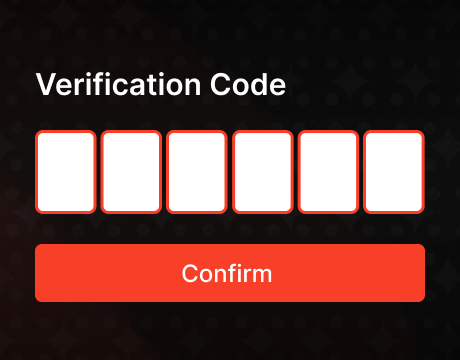
Enter the SMS code, finish the remaining account details, and use your registered email and password for your first Moonspin login.
Casino Games Available in the App
The Moonspin casino app provides access to more than 1,500 games on supported mobile devices. Players can browse slots, table games, fast titles, and Moonspin Originals through the same Android or iOS interface.
Slots Games
Moonspin offers classic reels, Megaways titles, themed slots, and feature-rich games from established providers. The mobile catalog includes the following options:
- 3 Power Dragons;
- Legend of Cleopatra Megaways;
- Buffalo Power Megaways;
- Four Lucky Clover;
- Wanted Dead or a Wild;
- Sun of Egypt;
- American Wonder Reels.




Specialized Games
Specialized games include Moonspin Originals, instant-win titles, and fast games with simple controls and short rounds. The available selection includes:



Bonuses You Can Access in the Moonspin Casino App
New players receive a welcome bonus of 60,000 Gold Coins and 2 Sweep Coins after registration and account activation. This is not a traditional deposit bonus, and no purchase is required to open an account or claim the starting reward.
The daily bonus awards 1,000 Gold Coins and 0.5 Sweep Coins. To qualify, the player must have less than 1 SC at the first login of the day and remain subscribed to Moonspin marketing communications.
Moonspin also offers tournaments, leaderboard competitions, Gold Coin purchase offers, and limited-time rewards. Moonspin Club members receive personalized bonuses, VIP coupon discounts, cashback, coinback, birthday rewards, and access to exclusive events.
Deposits & Withdrawals via the Moonspin Casino App
Moonspin uses Gold Coin purchases and Sweep Coin redemptions instead of traditional casino deposits and withdrawals. Players can purchase GC packages using ACH or a bank card, while eligible SC winnings can be redeemed through a linked bank account after KYC verification and the required playthrough.
| Transaction Detail | Moonspin Terms |
|---|---|
| Purchasable currency | Gold Coins |
| Purchase methods | ACH and card payment |
| Sweep Coins | Included free with selected GC packages |
| Minimum redemption | 100 eligible SC |
| Redemption method | Linked bank account |
| Processing time | Most redemption requests are completed within 5 business days |
| Redemption limits | Up to $2,500 daily, $7,500 weekly, and $15,000 monthly |
Gold Coins cannot be redeemed or exchanged for cash. Players can cash out eligible prizes only through Sweep Coin redemptions after completing identity, address, and account verification.
Security Features of the Moonspin Mobile App
Moonspin protects player data with encryption during transmission and storage. Account security includes strong password requirements, two-factor authentication, phone verification, and KYC checks that confirm identity, age, and account ownership.
Payment methods must belong to the registered player, which reduces unauthorized purchases and redemptions. Moonspin also supports purchase limits, session controls, reality checks, and self-exclusion tools for safer mobile play.
Mobile Experience in the Moonspin Casino App
The Moonspin app uses a responsive interface that adapts to Android smartphones, iPhones, and tablets. Touchscreen controls make it easy to browse categories, search for games, switch currencies, and open titles in portrait or landscape mode.
Players can manage their balance, bonuses, Gold Coin purchases, and Sweep Coin redemptions on mobile. The navigation provides quick access to slots, specialized games, promotions, tournaments, account settings, and customer support.
FAQs About the Moonspin Casino App
Is the Moonspin Casino App available in my state or country?
Moonspin is available only in permitted U.S. states. Access is blocked in ID, LA, NV, MI, MT, NE, ND, GA, CT, DE, NY, NJ, CA, TN, WA, and abroad.
How can I play Moonspin Casino on my mobile device?
Open the online version of Moonspin in Safari or Chrome, add it to your home screen, log in, select a currency, and choose a game.
What games are available in the Moonspin Casino App?
The mobile catalog includes 1,500+ slots, table games, and Moonspin Originals.
How do I update Moonspin Casino on my mobile device?
Moonspin updates automatically through the mobile browser, so no manual installation is required. Refresh the page, update Chrome on Android, or install the latest iOS version to update Safari.
What should I do if Moonspin Casino is not working properly?
Check your internet connection, refresh the page, restart the browser, clear the cache, disable blocking extensions, and log in again using your registered details.
How can I remove Moonspin Casino from my mobile browser?
Press and hold the Moonspin home screen icon, select Remove App or Delete Bookmark, and then clear Moonspin site data from your mobile browser.

 PokerListings




Log in to leave a comment
Takes a minute. Your rating counts toward the score.