EN
EN  DE
DE 

Unibet Poker Mobile App: How To Download for iOS and Android
The Unibet poker app is your official gateway to thrilling poker action on the go. Available for both iOS and Android devices, it allows you to enjoy cash games, Sit & Go tournaments, and multi-table events anytime, anywhere. With a quick and secure Unibet poker download, you’ll have access to a seamless mobile experience designed for players of all levels. Whether you’re an iPhone user or prefer Android, downloading the app is simple and straightforward. Ready to get started? Let’s walk you through how to download the app for your device.
Download Unibet Poker Mobile App for iOS

Getting the Unibet poker iOS app on your iPhone is quick and easy. Follow these steps to start playing poker on the go:
- Visit the Official Website. Open the Unibet website on your iPhone’s browser and navigate to the mobile apps section.
- Select the Poker App. In the mobile apps section, choose the option for the poker app and tap the “Download App” button.
- Tap the iOS Icon. On the download page, locate and tap the iOS icon to proceed with the installation for iPhone.
- Redirect to the App Store. You’ll be redirected to the App Store page for the Unibet Poker app.
- Download the App. Tap the “Get” button in the App Store to start downloading the app.
- Install and Open. Once the download is complete, the app will automatically install. Open the app and log in or create an account to start playing.
The Unibet poker iOS app is optimized for smooth gameplay on all iOS devices, ensuring a seamless experience for poker enthusiasts. Based on our own experience, the app provides a user-friendly interface and reliable performance, making it the perfect choice for poker players on iPhone.
Download Unibet Poker APK for Android
Installing the Unibet poker Android app is a straightforward process. Follow these steps to get started:
- Visit the Official Website. Open the Unibet website on your Android device and navigate to the mobile apps section.
- Select the Poker App. In the mobile apps section, choose the poker app and tap the “Download App” button.
- Tap the Android Icon. On the download page, locate and tap the Android icon to proceed with the installation for your device.
- Redirect to Google Play. You’ll be redirected to the Google Play Store page for the Unibet Poker app.
- Download the App. Tap the “Install” button in the Google Play Store to begin downloading the app.
- Install and Open. Once the download is complete, the app will automatically install. Open the app, log in, or create an account to start playing.
There’s no need to search for or install a separate APK file, as the official Unibet Poker app is readily available on the Google Play Store. Based on our tests, the app is intuitive and perfect for poker enthusiasts who want to play on the go.
Unibet Poker App System Requirements
To ensure a smooth experience with the Unibet poker app, your device must meet the following system requirements. Whether you’re using an Android or iOS device, the app is optimized for modern mobile platforms. Check the details below:
| Platform | Version | Required OS Version |
|---|---|---|
| Android | 3.52.0 | Android 5.0 and above |
| iOS | 3.52.0 | iOS 12.0 or later |
Make sure your device is updated to the required version to enjoy all the features, including Cash Games, Sit & Go, and tournaments. The app is lightweight and runs efficiently on most modern smartphones, providing a seamless poker experience.
How To Update Unibet Poker App to the Latest Version
Keeping the Unibet Poker app updated is essential to access the latest features, improvements, and security enhancements. Both iOS and Android users can easily install updates directly from the App Store or Google Play Store. Additionally, enabling auto-updates on your device ensures you never miss an important update. This way, the app will always stay current without requiring manual action. Regular updates not only improve performance but also provide access to new features, making your poker experience smoother and more enjoyable.
Registration Process via Unibet Poker App
Registering through the Unibet Poker application is simple and free of charge. Follow these steps to create your account:
Launch the Unibet Poker app on your mobile device.
On the home screen, select the “Register” button to begin the process.
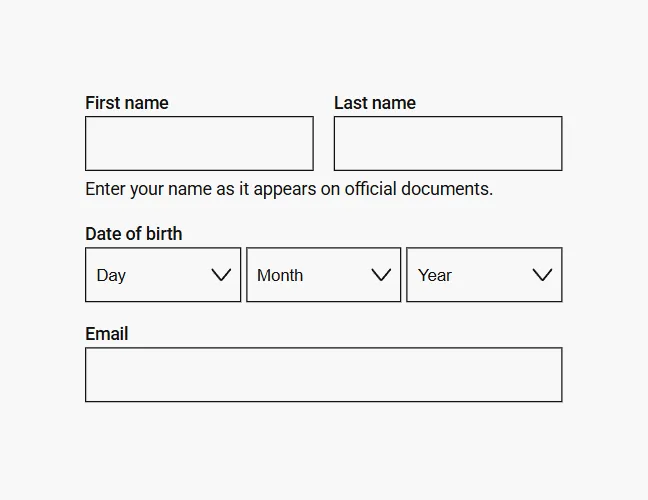
Enter your first and last name, address, email, date of birth, and phone number.
Verify that you meet the legal age requirements and provide any requested documents for identity verification.
Unibet will review your information and documents. Once approved, your account will be activated.

Use your credentials to log in and enjoy the full features of the app.
The registration process is quick and ensures secure access to all poker games and features.
Play Unibet Poker App for Real Money
The Unibet poker mobile app is perfect for players looking to enjoy poker app for real money anytime, anywhere. After registering and making your first deposit, you’ll unlock access to cash games, tournaments, and exclusive online poker rooms. With fast withdrawals, secure payment options, and a welcome poker offer, the app provides a seamless and reliable experience. Ready to dive into the world of real-money poker? Let’s explore where the Unibet Poker app is available and what players should know before getting started.
Legal States for Using the Unibet Poker App
The Unibet Poker app and site do not accept players from the United States. It is available only in regions where online poker is legally permitted and regulated.
Unibet Poker App in the United Kingdom
The Unibet Poker app is fully licensed and regulated in the United Kingdom, providing a secure and reliable platform for local players. Players in Great Britain are protected under the oversight of the UK Gambling Commission, ensuring fair play and responsible gaming practices.
The app is designed for players who want to enjoy poker on the go, offering access to cash games, tournaments, and Sit & Go events. It’s free to download and provides a seamless experience for both new and experienced players. For UK players, the app operates within a regulated environment, making it a trusted choice for poker enthusiasts in the region.
Benefits of the Unibet Poker Mobile App
The Unibet Poker mobile app offers a feature-rich and user-friendly experience, making it a top choice for poker enthusiasts. Whether you’re a casual player or a seasoned pro, the app provides everything you need for an enjoyable and seamless poker journey.
Key Benefits:
- Cash Games, Sit & Go, and Multi-Table Tournaments: Play your favorite formats anytime.
- Personalization: Choose from 100+ avatars to express yourself.
- Regular Promotions: Enjoy updated missions and exciting rewards.
- Seamless Experience: Switch effortlessly between app and browser.
- Casino Games: Access casino games directly from the poker client.
With these features, the app ensures a dynamic and rewarding poker experience on the go!
Unibet Poker Mobile App Overview
The Unibet Poker mobile app delivers a seamless poker experience, ensuring that players enjoy the same high-quality gameplay as on desktop or in a web browser. Whether you’re at home or on the go, the app provides all the features you need for an exceptional poker session.
Key highlights of the app include:
- Consistent Experience: Enjoy the same interface and features across desktop, mobile, and browser platforms.
- Fast Payments: Secure and quick deposit and withdrawal options for hassle-free transactions.
- Wide Accessibility: Available on both Android and iOS devices, ensuring compatibility with most smartphones.
- Full Poker Features: Access cash games, tournaments, and Sit & Go events without limitations.
- User-Friendly Design: Intuitive navigation and smooth gameplay for all skill levels.
The Unibet Poker app is perfect for players who want flexibility without compromising on quality.
FAQs About Unibet Poker App
Is it safe to use the Unibet Poker app to play poker?
Yes, the app is licensed, regulated, and uses secure technology to protect your data.
Can I download the Unibet Poker app for free?
Yes, the app is free to download on both Android and iOS devices.
Are all Unibet Poker bonuses available for mobile players?
Yes, mobile players have access to the same Unibet poker bonuses as desktop users.
Do I need to register for the Unibet Poker app separately?
No, one account works across all Unibet platforms.
Do I need to update the Unibet Poker app to the latest version?
Yes, updating ensures access to the latest features and improvements.
Can I play with friends on the Unibet Poker app?
Yes, Unibet offers private home games/tournaments for playing with friends.
What should I do if the Unibet Poker app doesn’t work?
Restart the app, check your internet connection, or reinstall it if needed.
How to delete (uninstall) the Unibet Poker app?
On iPhone, touch and hold the Unibet Poker app icon, tap Remove App, and confirm. On Android, open Google Play Store, tap your profile icon, go to Manage apps & devices → Manage, select Unibet Poker, and tap Uninstall.
How to create a club in the Unibet Poker app?
Unibet does not have a separate club feature. Instead, it offers Private Poker / Home Games. To set up a private room, you need at least 6 players. You must also complete Unibet’s form at least 48 hours before the tournament starts, and all players must have an active Unibet account with enough balance for the buy-in.

 PokerListings