
 EN
EN  DE
DE 
Gleaming Slots Casino App: Download for iOS & Play on Android 2026
The Gleaming Slots Casino app gives players a fast, polished way to enjoy casino slots from most mobile devices in 2026. iPhone and iPad users can download the iOS app for direct access to themed slots, rewards, events, tournaments, and SC (Sweeps Coins) play. Android players can use a mobile browser or the supported Google Play version to enjoy smooth gameplay without losing key account features. The platform is built for quick loading, simple navigation, and reel action on the go.
Download Gleaming Slots Casino App for iOS
The Gleaming Slots mobile app is built for iPhone and iPad players who want direct mobile access without opening a browser every time. Installation takes only a few minutes, and the app keeps the full casino experience organized for quick daily play and longer sessions. Once installed, players can log in, check available promotions, and start playing from their Apple device.
Open the App Store on your iPhone or iPad.
Search for Gleaming Slots.

Select the Gleaming Slots Casino app from the results.

Tap Get to begin the download.
Confirm the installation with Face ID, Touch ID, or your Apple ID password.

Wait for the app to install on your device.
Open the app from your home screen.

Sign in to your existing account or create a new one.
How to Play Gleaming Slots Casino on Android
Android players get a flexible mobile experience with Gleaming Slots Casino through either a browser or the supported Android app. The mobile site loads smoothly on modern Android phones and tablets, giving players access to account login, slot games, rewards, promotions, and coin-based gameplay without extra setup. The Google Play version also gives Android users a direct app route for quick access.
Follow these step-by-step instructions to start playing on mobile:

Open Chrome or another trusted browser on your Android device.
Go to the Gleaming Slots Casino website.
Tap Login if you already have an account, or Sign Up to create one.

Complete the registration process and verify your details.
Add the site to your home screen for faster access.

Open your account dashboard.
Review your Gold Coins (GC), Sweeps Coins (SC), daily rewards, and active promotions.
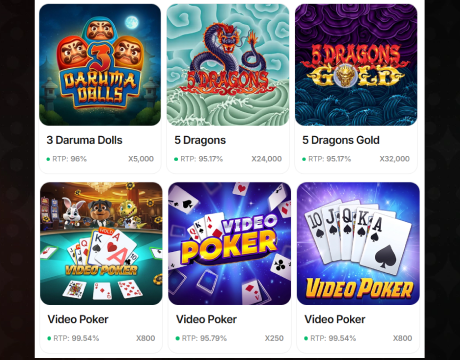
Choose a slot game from the lobby.
Adjust your bet level before spinning.
Start playing directly from your Android phone or tablet.
Alternatively, install and start playing through the Android app:

Open Google Play on your Android device.
Search for Gleaming Slots: Gold Casino.
Select the correct app listing.
Tap Install.
Open the app after installation.
Log in or register.
Start playing from the Android app interface.
Gleaming Slots App System Requirements
Gleaming Slots works across modern iOS and Android devices, giving players direct app access or browser-based mobile play. iPhone and iPad users need iOS or iPadOS 15.6 or later, while Android players need a compatible device with Google Play access or an updated mobile browser. The table below outlines the key system requirements for installation, account access, storage, connection quality, and smooth gameplay.
| Requirement | iOS App | Android App |
|---|---|---|
| Supported devices | iPhone, iPad, iPod touch | Android phones and tablets |
| Operating system | iOS 15.6 or later; iPadOS 15.6 or later | Android 8.0 (Oreo, API 26) or later with Google Play access |
| Storage space | At least 200 MB | At least 200 MB |
| Internet connection | Stable Wi-Fi or mobile data required | Stable Wi-Fi or mobile data required |
How to Update Gleaming Slots Casino on Mobile
Keeping Gleaming Slots updated gives players the latest app version, smoother performance, security improvements, bug fixes, and full access to current mobile features. iOS users update the app through the App Store, while Android users update it through Google Play; browser users should use the latest mobile browser version and clear the cache if the site loads slowly.
Step-by-step guide:
- Open the App Store on iOS or Google Play on Android.
- Search for Gleaming Slots.
- Open the app listing.
- Tap Update if a new version is available.
- Wait for the update to finish installing.
- Restart the app after installation.
- Log in to your account.
- Check that your balance, rewards, and games load correctly.
For browser play on Android:
- Open Chrome or your preferred mobile browser.
- Go to the Gleaming Slots website.
- Clear the browser cache if the site loads slowly.
- Refresh the page.
- Log in and continue playing from the updated mobile version.
Registration Process via Gleaming Slots Casino App
Creating a Gleaming Slots account through the mobile app is quick and simple. Once registration is complete, players can claim available rewards, review account settings, and start playing directly from the app. Follow these steps:
Open the Gleaming Slots Casino app on your mobile device.
Tap Sign Up.
Enter your email address and create a secure password.
Add the required personal details.

Confirm that you meet the age and location requirements.
Accept the terms and privacy policy.
Submit the registration form.

Verify your email address.
Log in to your new account.
Casino Games Available in the App
Gleaming Slots gives mobile players a broad casino game lobby built around fast access, smooth navigation, and coin-based play. The app focuses on slots first, while table games and specialized titles add more variety for players who want different formats beyond standard reels.
Slot Games
Slots are the core of the Gleaming Slots app, giving players a large reel-focused lobby with classic casino themes, jackpot action, bonus rounds, multipliers, free-spin features, and quick mobile sessions. The app is designed around tap-and-spin gameplay, so users move from the lobby to active play in seconds. Gold Coins support entertainment play, while Sweeps Coins unlock promotional prize play where available.




Table Games
Table games add a more strategic side to the Gleaming Slots app, giving players casino options beyond spinning reels. The category is built for users who prefer card games, number-based games, and dealer-led formats with clear rules and responsive mobile controls. Players use the same account balance system across the app, making it simple to move between slots and table games.




Specialized Games
Specialized games give Gleaming Slots extra variety beyond standard slots and table formats. This category includes arcade, shooting, instant-win, and feature-led games designed for quick sessions, simple rules, and immediate action. Players use these games to break up longer slot play, try quick-play formats, and explore different gameplay styles within the same mobile account.
Bonuses You Can Access in the Gleaming Slots Casino App
Gleaming Slots gives mobile players several bonus routes directly through the app. New users start with a free welcome offer of 10,000 Gold Coins and 0.3 Sweeps Coins. Existing players can claim daily login rewards, including 2,000 GC on day one, 20,000 GC plus 0.5 SC on day seven, and 63,000 GC plus 1.55 SC across a full week. The app also supports mail-in Sweeps Coins requests, social tournaments, Mission Board rewards, loyalty perks, and birthday bonuses for regular players without requiring promo codes or mandatory Gold Coin purchases upfront.
Deposits & Withdrawals via the Gleaming Slots Casino App
Gleaming Slots doesn’t operate like a traditional real-money casino app. Visa credit and debit cards are accepted for purchasing Gold Coins, and Sweeps Coins are included as a bonus in relevant packages.
Players redeem prizes by exchanging eligible Sweeps Coins. Before submitting an exchange request, players must use Sweeps Coins in promotional play mode, meet the required playthrough terms, collect at least 100 eligible SC, and verify their identity.
| Payment Feature | Gleaming Slots App Details |
|---|---|
| Payment method | Visa credit and debit cards |
| Redemption currency | Eligible Sweeps Coins |
| Minimum redemption | 100 SC |
| Verification | Photo ID and address confirmation |
| Processing time | Up to 10 business days |
| Daily redemption cap | 10,000 SC |
Security Features of the Gleaming Slots Mobile App
The Gleaming Slots mobile app protects player accounts with secure login, encrypted mobile sessions, account verification, and identity checks before prize redemptions. Players must confirm personal details, verify eligibility, and provide valid documents when redeeming Sweeps Coins for cash prizes. Location access supports jurisdiction checks, while protected payment handling keeps Visa card purchases tied to approved Gold Coin bundles. The app also separates Gold Coins from Sweeps Coins, helping users track entertainment play and prize-eligible currency clearly.
Mobile Experience in the Gleaming Slots Casino App
The Gleaming Slots Casino app delivers a smooth mobile experience for players who want fast access to slots, rewards, and account features. The interface is built for quick navigation, with a clear lobby, responsive game loading, and simple controls for short or extended sessions. iOS users get direct app access, while Android players can use the app or mobile browser without losing core functionality. Balances, bonuses, tournaments, missions, and redemption tools stay easy to reach, giving eligible players in supported locations a complete casino experience from their phone or tablet in 2026.
FAQs About the Gleaming Slots Casino App
Is Gleaming Slots Casino available in my state or country?
The Gleaming Slots app is only available in the US. In New York and California, you can only play with Gold Coins; access to the app is fully prohibited in Connecticut, Delaware, Idaho, Kentucky, Michigan, Montana, Nevada, New Jersey, Tennessee, and Washington. In all other states, you can play with Sweeps Coins.
How do I download the Gleaming Slots Casino App on iOS?
Open the App Store, search for Gleaming Slots, select the correct app listing, tap Get, confirm installation, then open the app and sign in or create an account.
What games can I play in the Gleaming Slots Casino App?
The Gleaming Slots app focuses on slot games, with table games and specialized titles adding variety.
How do I update the Gleaming Slots Casino App?
Update Gleaming Slots through the App Store on iOS or Google Play on Android. Open the listing, tap Update, wait for installation, then restart the app and log in again.
What should I do if the Gleaming Slots Casino App is not working?
Restart the app, check your internet connection, update to the latest version, clear the cache for browser play, confirm location access, and log in again after restarting your mobile device.
How do I remove the Gleaming Slots Casino App from my iPhone?
Press and hold the Gleaming Slots app icon on your iPhone, tap Remove App, choose Delete App, confirm removal, and clear any saved shortcuts for a clean uninstall.

 PokerListings




Log in to leave a comment
Takes a minute. Your rating counts toward the score.